
TerraModeler User Guide
Creating a surface model
TerraModeler can create a surface model from a number of data sources. The best tool to use depends on the source and format of the data:
Data source: |
Use tool: |
|---|---|
Survey data |
Triangulate Survey after reading in the survey data with TerraSurvey. |
Design file elements |
|
XYZ text file |
Surfaces tool opens a window for managing surfaces. The File pulldown menu in this window has a command for importing xyz text files. |
To create a surface model:
1.Follow the steps for the individual tools to start the surface model creation.
After the tool-specific steps, the Triangulate surface dialog opens:
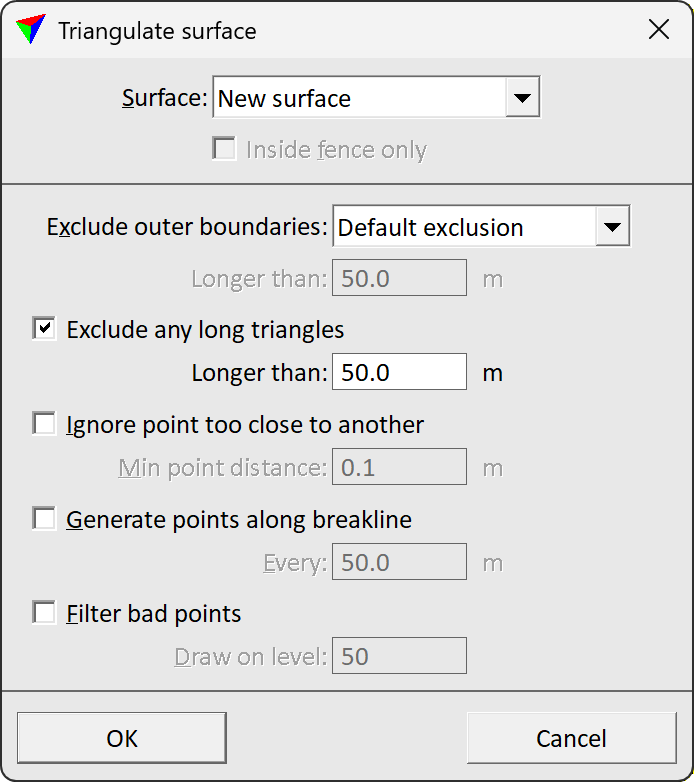
2.Select the surface to be triangulated. You can select a new surface or an existing surface that is loaded in TerraModeler.
3.If required, select additional settings for excluding triangles and point handling.
4.Click OK.
Setting |
Effect |
|---|---|
Surface |
Determines how the surface is created: •New surface - a new surface is created. •<surface name> - new features are added to an existing surface model that is loaded in TerraModeler. |
Create as profile model |
If on, the surface is created from a centerline element. TerraModeler internally copies the element to the left and right, and uses these elements for surface creation. |
Exclude outer boundaries |
Exclusion method of outer boundary triangles of the surface model: •No exclusion - no triangles are excluded. •Default exclusion - the software computes a reasonable triangle length for exclusion from the surface’s point density. •By key-in length - triangles with edge lengths given in the subsequent Longer than field are excluded. |
Exclude any long triangles |
If on, any triangles with edge lengths longer than the value given in the subsequent Longer than field are excluded. |
Ignore point too close to another |
If on, the model is thinned by leaving out unnecessary points. If the distance between two points is less than Minimum point distance, one of the points is left out. |
Generate points along breakline |
If on, the model is improved by generating new points along any long breaklines. Points are generated at a distance given in the Every field. |
Filter error points |
If on, probable survey errors are filtered out from the model. Points that have been filtered out are drawn as small circles on the level defined in the Draw on level field. |
If a new surface is created, the software opens the Surface Settings dialog:
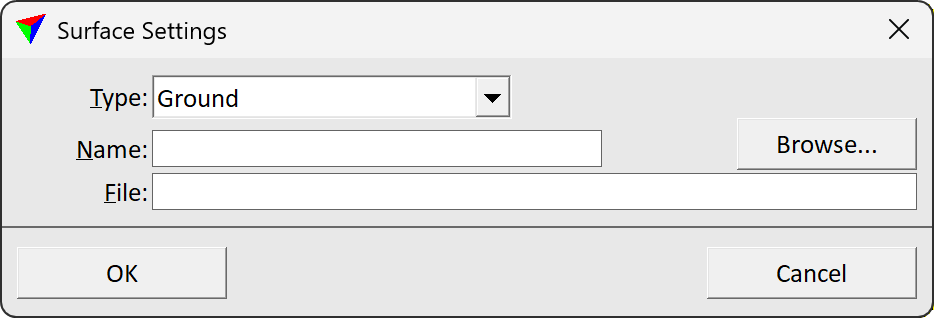
5.Select a surface Type and a Name for the surface.
6.(Optional) Rename the File for storing the model on the hard disk. Browse storage destination for saving the model.
7.Click OK.
TerraModeler creates the surface model. A progress bar shows the process. After the process is finished, the time needed for the creation process is displayed in the status bar of the CAD platform.